
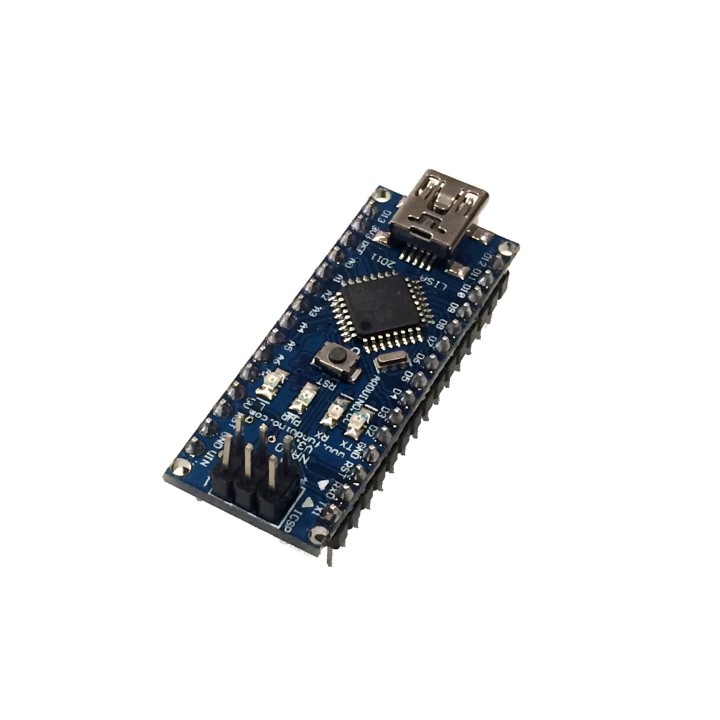
Arduino-Compatible Nano images
Arduino-Compatible Nano
Price:
$12.99
Save space with this Arduino-Compatible Nano! Fully Arduino Compatible so all your Arduino programs will run just the same in a tiny form factor! Plug in a mini USB cable and you're good to go! Replaces Arduino Nano 328.
This Arduino-compatible Nano is a great alternative to an Arduino UNO in your projects. Comes pre-soldered so you can just download the drivers and pop onto a breadboard! Power using a 7V-12V power supply or via mini USB and that's it! Wire into your circuit using the pin diagram in the images above and plug into your computer's USB port to program!
Features:
- Our Third Smallest Arduino-Compatible Board! (Smallest is the ATtiny85 Breakout Board with 6 I/O pins, Second Smallest is the Pro Micro)
- ATmega328 running at 5V/16MHz
- Supported in the Arduino Programming Software (IDE) v1.0.1
- mini USB connector onboard for programming
- 8 Analog pins
- 14 Digital I/Os (6 are PWM capable)
- Rx and Tx Hardware Serial Connections
- Supports unregulated Power Supplies up to 12V via the VIN pin.
Specifications:
- Main Chip: Atmega328
- Mini USB connector on board
- Input Power Supply: Accepts 7V - 12V on the VIN pin for powering the board, 5V via Mini USB port
- Operating Voltage: 5V (same as all other Arduino-based boards)
- Frequency: 16Mhz
- Comprable to the Arduino Nano and other Atmega328 based boards
- When Programming via Arduino IDE, be sure to select board type: Arduino Nano, processor: ATmega328 or on some Mac computers select board type: UNO
Initial Setup:
- Install the FT232RL Driver for your Operating System:
- Plug a mini USB Cable into your Computer
- Connect the mini USB Cable to your Nano board
- Open the Arduino IDE
- Go to File->Examples_>01.Basics -> Blink
- In the Arduino IDE select Tools->Board->Arduino Nano
- In the Arduino IDE select Tools->Processor->ATMega328
- Click the Checkmark button on the top menu to verify the test code
- Click the Arrow button to upload to your Nano
- You should now see your Nano's LED blink at the speed set in the example code.
-
Brand

-
ReferenceTS1744
-
In stock15 Items
4 other products in the same category
Clients also bought
- -$2.33
Comments (0)
Your review appreciation cannot be sent
Report comment
Report sent
Your report cannot be sent